
FREE MAC APP
ID3 Show Tagger
Tag every episode
in one drop.
Built for podcast editors and agencies. Save the tags for each show, drop your episode MP3s, and send files with the right titles, show details and cover art.
Download for MacVersion 1.0 · 1.5 MB · macOS 14 or later
Apple silicon & Intel · Free, no account
This release is not notarized by Apple. macOS will show a warning on first open. Read the install steps.
Windows version planned.
Your files stay on your Mac.
Works offline.
No audio re-encoding.
MADE FOR THE NEXT EPISODE
One show or ten.
Keep the details straight.
If you edit for more than one client, you know the small checks add up. Save a preset for each show so you don’t have to type the same details again.
- 01
Add your show.
Set the host name, show name, cover art and description. Save them as a preset.
- 02
Drop your MP3s.
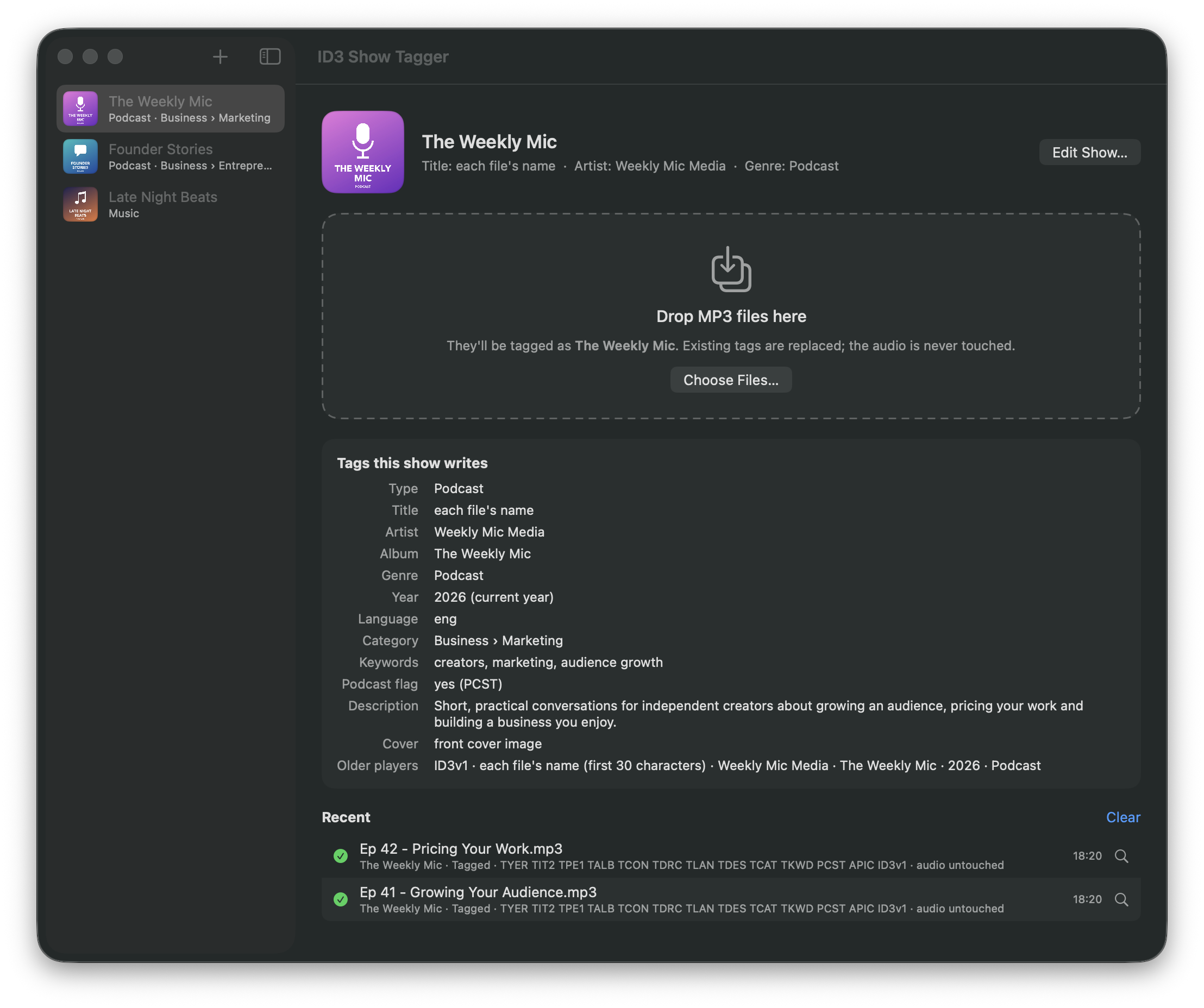
Select your show template and drop an MP3 or a folder on the window. The tags are applied and each file saves automatically.
- 03
Check. Then hand off.
Review the results and spot-check a file. There is no separate export step, and the audio is not re-encoded.
Before your first batch: keep a copy of the original MP3s. Existing tags are replaced, and blank preset fields are left out. Use each file’s name for the title when episodes need different titles.
THE DETAILS TRAVEL WITH THE FILE
A place for
the whole show.
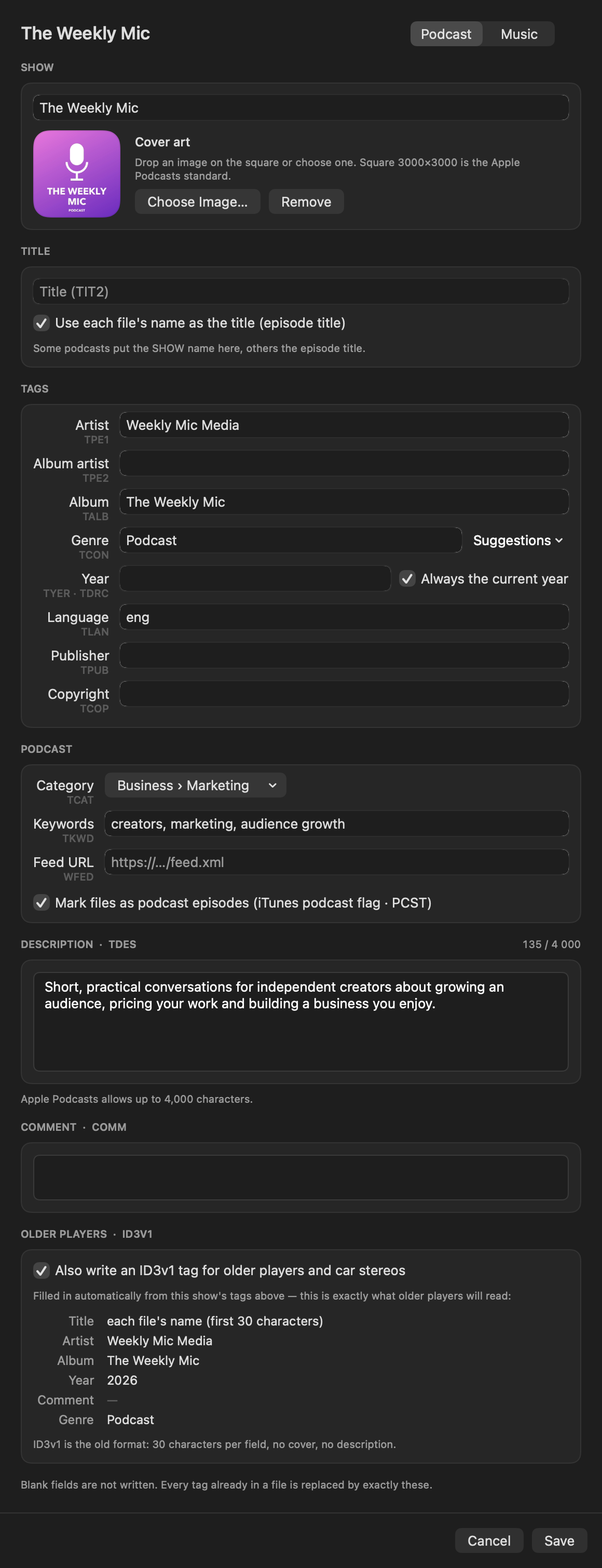
Set up your podcast’s details once. Keep the host, show name and artwork ready for the next episode.
- Your podcast details
- Episode title, host or creator (Artist), show name (Album), cover art, year, language, publisher and copyright.
- More context for each episode
- Category, relevant keywords, RSS feed URL and a description of up to 4,000 characters. Add your podcast website or episode notes URL to the description.
- Music support, too
- The app also has a music mode with a Composer field. It writes ID3v2.3 tags with Unicode support and offers optional ID3v1 tags for older players.
These tags are saved in the MP3. Your podcast host still manages the RSS feed and public listing.
What ID3 tags do for your podcastFIRST TIME ON YOUR MAC
Download. Install.
Add your first show.
Open the downloaded disk image and drag ID3 Show Tagger into Applications. Then open the app from there.
About the first-open warning
This release is not signed with an Apple Developer ID or notarized by Apple. macOS cannot verify it and will block the first launch. Only continue if you trust the download.
- Try opening ID3 Show Tagger, then dismiss the warning.
- Open System Settings → Privacy & Security. Find the message for ID3 Show Tagger and choose Open Anyway.
- Authenticate if asked and confirm that you want to open this app.
This creates an exception for the app. See Apple’s first-open guidance ↗.
Release details & checksum
- Version
- 1.0 (build 2)
- Requires
- macOS 14 Sonoma or later · Apple silicon or Intel
- Download
- 1,501,575 bytes · DMG
- SHA-256
733731aba30e6501c46b8ff7f86bb0f06c92db0e3a3d397f270885c040d8fb78Download checksum
A few useful answers.
Does it change my audio?
The app changes the tags without re-encoding the audio. It writes a new copy, checks that the audio bytes are identical, then replaces the original file. Keep a backup if you need to restore the old tags.
Is it really free?
Yes. No account, sign-up or trial. ID3 Show Tagger is a free app from Engaging Boost. Editor Booster is a separate product.
Does it upload my files?
No. Tagging happens on your Mac, offline. The app has no analytics or tracking. The website link in its About window opens only when you click it.
Which files can I use?
MP3 files only. Drop them on the app window or Dock icon, drop a folder, or use Choose Files. Other formats are refused.
Can I use it on Windows?
The current download is for Mac. A Windows version is planned, with no release date yet.
Where are my shows saved?
On your Mac, in ~/Library/Application Support/Show Tagger/. To uninstall, drag the app to the Trash. You can also delete that folder if you want to remove your saved shows.